Your serving schedule
My schedule is the first thing Serve shows you: every upcoming assignment you have, in date order, with what you are doing and when. It updates the moment your parish changes something, so it is always the version to trust.
Reading an assignment
Each assignment is a card showing:
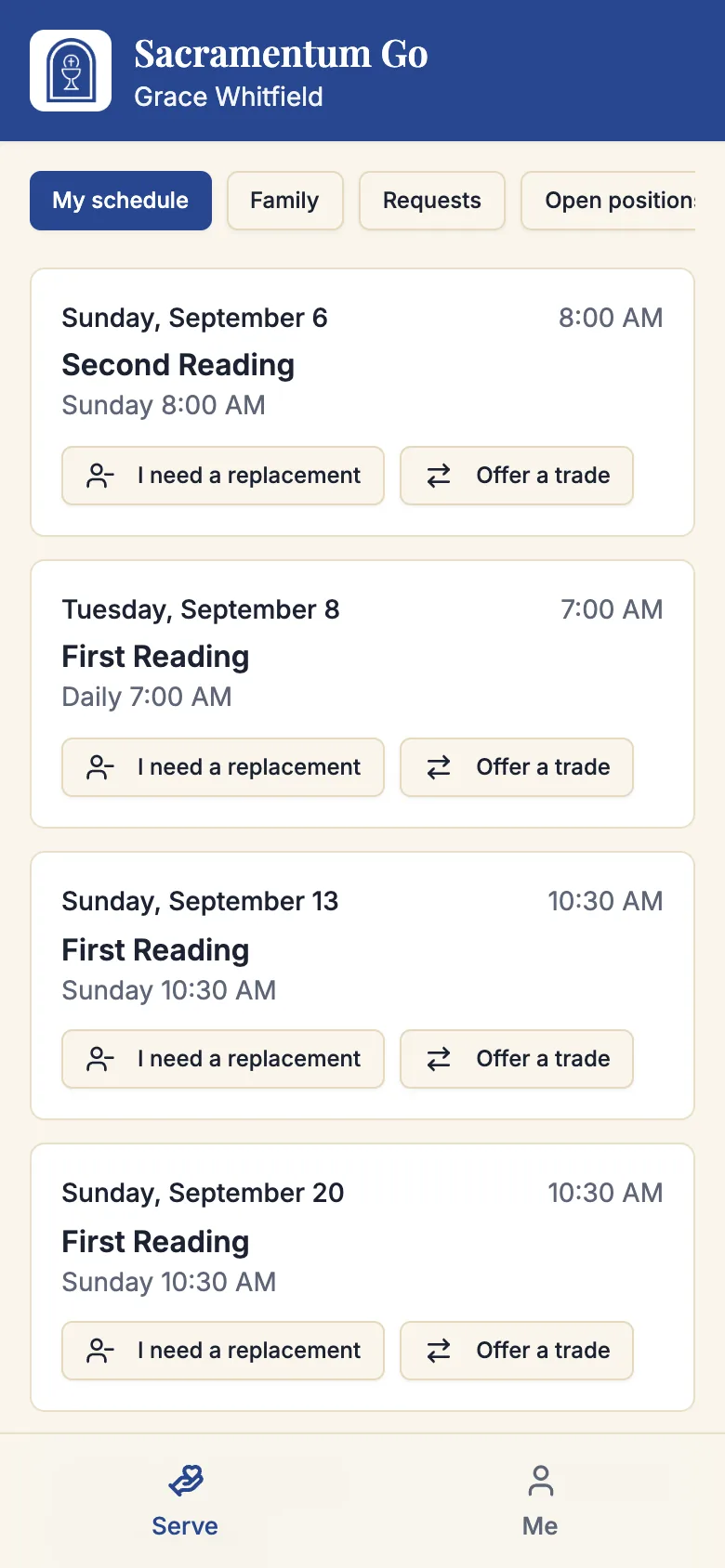
- The day and date, written out — "Sunday, October 12."
- The start time of the service.
- The role you are serving in, or the specific position if your parish labels them — "Lector," "Cup 2," "Thurifer."
- The service itself, when your parish gives it a name.
If you have asked to be replaced and nobody has accepted yet, the card carries a blue badge: Replacement requested — you serve until someone accepts. That is deliberate. Your position is never left silently empty; you remain responsible until somebody actually says yes.
If you have no upcoming assignments, the page says so: You have no upcoming assignments right now.
Your schedule only shows assignments on schedules your parish has published. A season your ministry leader is still building is invisible to you — that is normal, not a mistake.
Your family's schedule
If your parish has your household linked, a Family section shows everyone in it who serves, grouped by person. A parent can see at a glance that one child serves Saturday evening and the other Sunday morning — and, if the family's scheduling policy asks for it, that they were placed at the same Mass on purpose.
You can take the same actions on a family member's assignment that you can take on your own, if you are recorded as their guardian. See Families and young servers.
Adding your schedule to your calendar
Rather than remembering to open Serve, put your assignments into the calendar app you already check.
- Tap Add to my calendar.
- Sacramentum creates a private calendar link and copies it. You will see Calendar link copied.
- Subscribe to that link in your calendar app.
Your assignments then appear alongside everything else in your life, and they update automatically as the parish changes the schedule.
Where to paste the link:
- iPhone and iPad — Settings → Calendar → Accounts → Add Account → Other → Add Subscribed Calendar.
- Google Calendar — Other calendars → + → From URL.
- Outlook — Add calendar → Subscribe from web.
The calendar link is private but not secret-proof: anyone who has it can see your serving schedule. Do not post it in a group chat or on a shared document. If you think it has been shared, tap Add to my calendar again to create a fresh link.
What you can do from an assignment
Each assignment carries the actions available to you:
- I need a replacement — you cannot serve, and you would like the parish to find someone. Your assignment stays yours until someone accepts.
- Offer a trade — you would rather swap with another volunteer than hand the position back.
Both are covered in Replacements and trades.
Close to a service — within about two hours — these buttons stop working, and you will be told Too close to the service for online requests — your leader has been notified. At that point, call the parish office.
Troubleshooting
My schedule is empty but I know I am serving
Either the schedule has not been published yet, or the assignment is further out than the list shows. Ask your ministry leader whether the schedule for that period is live.
An assignment disappeared
Someone accepted your replacement request, you completed a trade, or the service was cancelled. If none of those is true, ask your ministry leader — they can see the assignment's history.
"Could not create your calendar link"
Try again in a moment. If it keeps failing, sign out and back in, then tap Add to my calendar again.
The calendar link stopped updating
Some calendar apps refresh subscribed calendars only every several hours. Force a refresh in your calendar app, and check the app's own sync settings before assuming the link is broken.
What's next
- Your availability — the best way to stop unwanted assignments appearing at all
- Replacements and trades — when you cannot make a date
- Open positions — take on an extra service
Related articles
- Serving in a ministry — opening Serve and joining a ministry
- Your serving preferences — which services, and how often
- Families and young servers — the Family section and guardians