Ministry reports
Ministry scheduling generates questions a spreadsheet cannot answer. Are we actually covered, or do we only feel covered? Is one family carrying three ministries? Do replacement requests get filled, or do they quietly expire? Whose Safe Environment certificate lapses next month? The reports answer those, over any date range you choose, for the ministries you lead.
Before you begin
- You need View reports access. Parish administrators hold it; ministry leaders receive it by grant and see only their own scope.
- Reports read from published and closed schedules. A season you have not published yet will not appear.
Running a report
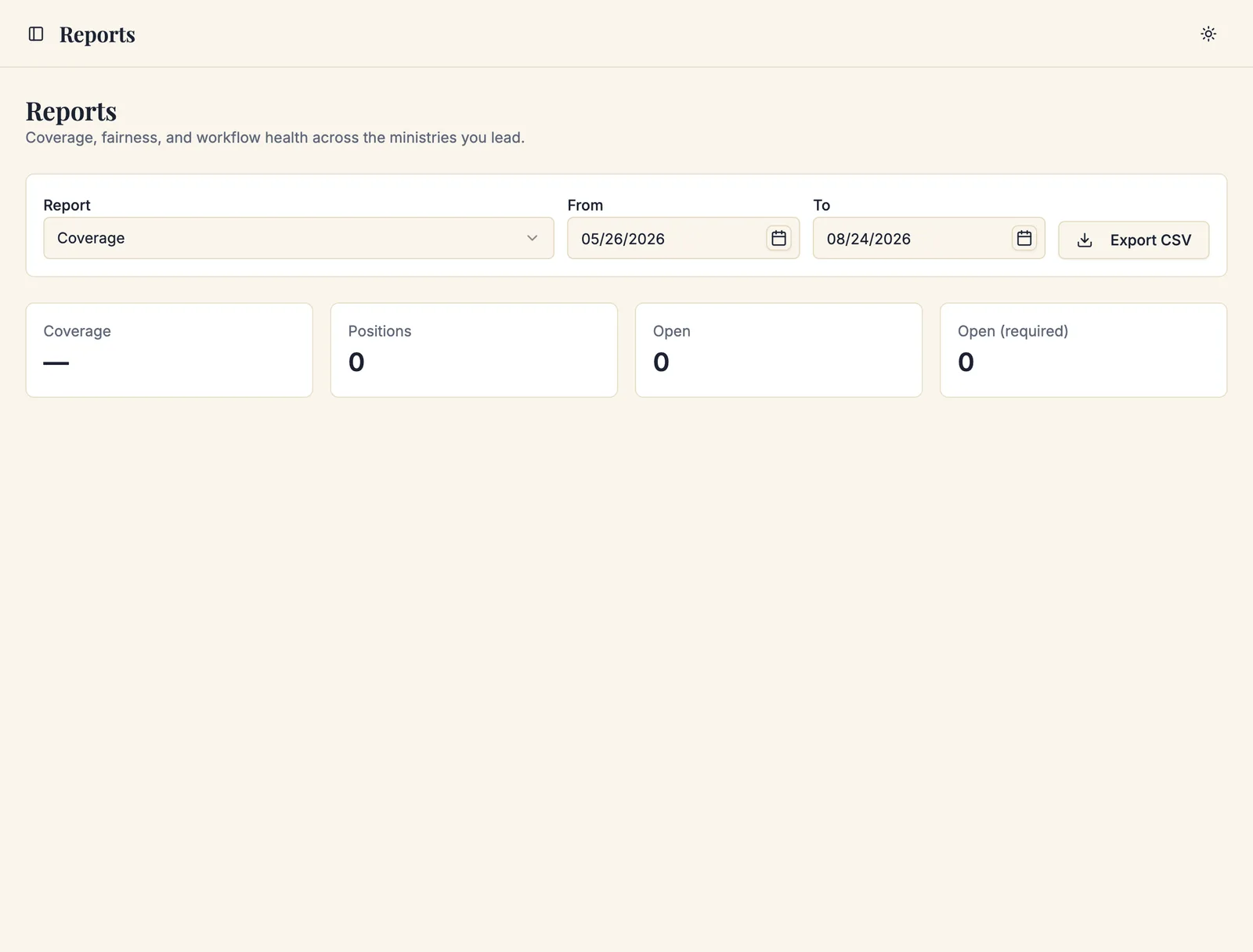
Navigate to Admin Dashboard → Ministry Scheduler → Reports.
-
Choose the Report from the dropdown.
-
Adjust the From and To dates if you need a different window.
Each report opens on the window that suits the question it answers. Coverage and Credential expiry look forward — they are about positions still to fill and certificates about to lapse. Every other report looks back over the last quarter. Once you set a range yourself, it stays put as you switch between reports.
-
Narrow by Ministry, Role, or Location if you only want part of the picture. The attendance reports always offer these; the others show them once you have narrowed something.
-
Read the results on screen, or click Export CSV to take them into a spreadsheet.
There are fifteen reports. They fall into three groups: what the schedule planned (coverage, planned fairness, conflicts, preferences), what actually happened (the six attendance reports and actual service fairness), and how the parish operates (replacement response, message delivery, leader workload, credential expiry).
The second group needs attendance to have been recorded. If nobody has opened the Attendance screen, those reports are empty — not broken.
Coverage
Answers are the positions actually filled?
Shows the overall Coverage rate, the number of Positions, how many are Open, and — separately — how many Open (required). A week-by-week breakdown charts filled against open, so you can see where coverage sags.
The most useful part is Unfilled required positions, soonest first. That is your call list, in the order you should work it.
Look at Open (required) rather than the headline coverage rate. A 92% coverage rate that is missing four required lectors is a worse week than an 80% rate where every gap is an optional usher.
Planned workload fairness
Answers is the load spread justly, as scheduled?
For each volunteer it shows how many times they Served, how many they were Expected to serve, how many Opportunities they had, the Deviation from expected, and a status:
| Status | Meaning |
|---|---|
| Over-served | Serving more than expected. |
| On target | About right. |
| Under-served (schedulable) | Serving less than expected, and there were positions they could have taken. |
| Under target (no opportunity) | Serving less than expected, but there was nothing they were eligible for. |
The distinction in those last two rows is the whole point of the report. Expected load is weighed against the positions each volunteer was actually eligible for, judged with today's memberships, availability, and policies — so someone available one weekend a month is not scolded for serving once a month.
Under-served (schedulable) is the list worth acting on: these are people who could serve more and are not being asked.
This report counts assignments. Somebody assigned twelve times who attended twice still reads as over-served here — which is what Actual service fairness is for.
Actual service fairness
Answers the same question as the report above, against attendance rather than assignments.
The two are worth reading together. Where they agree, the schedule describes the parish. Where they disagree, the schedule is a plan somebody else is quietly carrying: a volunteer who is repeatedly assigned and repeatedly absent shows as over-served on the planned report and under-served here, and whoever substitutes for them shows the reverse.
This report requires attendance. Without it there is nothing to compare the plan against.
Conflicts
Answers did we schedule anyone over a rule?
Shows how many Assignments checked and how many were Flagged, then lists each flagged assignment with the date, service, volunteer, and the conflicts it carries. Run this after publishing a season to see what overrides accumulated.
Preferences honored
Answers are we listening to what volunteers told us?
Shows the share of assignments At a preferred service and the share At a service they avoid, with a breakdown across Preferred, Acceptable, Avoided, and No preference stated.
A rising "avoided" share is an early warning: volunteers who are repeatedly scheduled at services they asked not to serve stop entering preferences, and then stop volunteering.
Replacement response
Answers does the replacement system actually work?
Shows the number of Requests, the share Filled, the share Expired, the Median to first reply, and the Median to fill.
A high expiry rate means the roster is too thin, the cutoff is too tight, or invitations are not reaching people — check the message delivery report next.
Message delivery
Answers are our notices arriving?
Counts across Sent, Pending, Superseded, Failed, No address on file, Suppressed by preference, and Awaiting printing.
No address on file and Failed are the two to act on. Both are fixed in the parish directory.
Leader workload
Answers is anything piling up?
Shows Pending sign-ups, Open replacement requests, the Oldest pending item, whether schedules were Published on time, and Attendance.
The oldest-pending figure is the honest measure of whether the requests inbox is being worked.
Two rows can report Not available rather than a number. Published on time needs a publishing goal set for the parish, and Attendance needs attendance to have been recorded. Both say so explicitly rather than showing a misleading zero.
Credential expiry
Answers whose certification lapses next?
Lists each Volunteer, the Credential, when it Expires on, how many Days left, its Verification status, and how many Affected assignments they already hold after that date.
That last column is what makes this report urgent rather than merely tidy: a Safe Environment certificate expiring on the 15th with six assignments after it is six positions about to become unfillable.
Sacramentum also emails volunteers ahead of expiry, using the lead days set under Settings → Ministry Scheduling.
Service hours
Answers how many hours has each person served? Use it for Confirmation service hours, school requirements, stewardship reports and thanking volunteers.
Each row is one Volunteer in one Ministry, with:
- Hours at services: Masses and events where they were checked in and attendance was confirmed, counted at the length of the service. Someone in two positions at one Mass served that hour once.
- Duty hours: hours entered when a duty was marked done.
- Logged by volunteers and Entered by staff: hours from the service log.
- Total hours.
Pick a Ministry to narrow the report. With parish-wide report access, you can also pick a Religious Education class, such as Confirmation 2026-2027, to see only the children registered in it.
Under the table, leaders who reconcile attendance see Logged hours: every logged entry in the range, with its note. Use the pencil to correct the day, hours or note, or the bin to remove an entry. Both ask for a reason. Hours from a finished duty are removed by reopening the duty on the schedule board. Hours at services come from attendance, so you correct those in Attendance.
To record hours that were not a duty or a scheduled service, such as a festival set-up, a paper sign-in sheet, or a Confirmation candidate without an account, choose Add hours. Pick the ministry, search for the person, then enter the day, the hours in quarter hours (up to 12) and an optional note. Ministry leaders can add hours for people who serve, or have served, in their ministry. Someone with parish-wide access can add hours for anyone in the parish. The hours appear as Entered by staff.
The attendance reports
Six reports read from what was recorded on the Attendance screen. All of them are empty until somebody records attendance, and all of them say plainly how much of what they show was observed rather than inferred.
Each carries a coverage line — "n of m tracked expectations resolved; k untracked" — and an eligibility line saying whether the opportunity counts behind it use evidence recorded at the time or an approximation from today's rules. Read those two lines before trusting a number. A report drawn from one recorded Sunday is not evidence of a pattern.
Expected versus actual attendance
Answers who was scheduled, and what actually happened?
The row-by-row report the other five are built on. For each volunteer and role it shows what was Expected, then the outcomes: Present as assigned, Substituted in, Substituted out, Extra service, No-shows (split into Leader no-shows and Automatic no-shows), Excused, Unconfirmed, and Untracked expectations.
The split between leader and automatic no-shows matters when you are judging somebody. A leader marked it deliberately; the 48-hour policy marked it because nobody said otherwise.
Attendance rates
Answers how reliably does each volunteer turn up?
A percentage per volunteer and role: confirmed services divided by confirmed services plus no-shows, counted by position. Confirmed substitutes and extras count as served.
Two deliberate exclusions keep the number fair. Excused absences are not counted against anyone — an absence the parish accepted is not unreliability. And no percentage is shown until there are five resolved opportunities for that volunteer and role, because three data points make anybody look either perfect or terrible.
Household workload
Answers is one family carrying more than its share?
Per household: Planned occurrences and Planned positions against Actual occurrences and Actual positions, plus the household's Weekend maximum and any Weekend violations.
Families are how volunteering actually distributes in most parishes, and a household that quietly serves every weekend is both the parish's greatest asset and its most likely burnout. This is the report that finds them.
Inactive volunteers
Answers who has drifted away?
Volunteers with eligible opportunities in the window and little or no recorded service, showing Eligible opportunities, Recorded no-shows, Recorded declines, and an Unavailable reason where there is one.
It is a pastoral list, not a disciplinary one. Somebody with many opportunities, no declines, and no service has usually stopped being asked, moved away, or is unwell — and the useful next step is a phone call.
Preferred-frequency fulfillment
Answers are we serving people as often as they asked to be?
Volunteers state how often they would like to serve — see Your serving preferences. This compares that Target against what actually happened, showing the Deviation and whether each is Within one service.
Being scheduled far less than requested is the failure worth chasing here. Somebody who asked to serve twice a month and served twice a quarter is a volunteer the parish is losing without noticing.
Attendance and reconciliation trends
Answers is our attendance recording keeping up?
A report about the process rather than the people: how much attendance is being resolved, how much is being closed automatically versus by a leader, and how much is still waiting.
A rising share of automatic no-shows usually means leaders have stopped recording, not that volunteers have stopped coming — and every downstream report gets less trustworthy at the same time.
A monthly rhythm
A ministry coordinator who looks at three reports a month stays ahead of almost everything:
- Coverage for the coming month — work the unfilled-required list.
- Credential expiry for the next 60 days — chase renewals before assignments break.
- Planned workload fairness for the last quarter — invite the under-served (schedulable) list.
Add Replacement response and Preferences honored quarterly, when you are deciding whether a policy needs changing rather than whether a Sunday needs covering.
If your parish records attendance, two more are worth a quarterly look: Inactive volunteers, which is a list of phone calls to make, and Household workload, which finds the family carrying too much before they stop.
Troubleshooting
A report is empty
Check the date range, and check that it covers schedules that were actually published. Also check your scope — a ministry leader sees only their granted ministries.
The fairness numbers look wrong
Read the basis note under the table. Expected load is calculated against the positions each volunteer was eligible for, not against the total number of positions. Someone who is unavailable most weekends has a low expected load by design.
The export will not download
The Export CSV button reports The export could not be created if the range is too large. Narrow the date range and export again.
What's next
- The requests inbox — where the pending items in the workload report live
- Ministries, roles, and members — record and renew credentials
- Scheduling rules and limits — adjust the caps a fairness report exposes
Related articles
- Building a schedule — fill the gaps the coverage report names
- Automatic scheduling — its own fairness comparison per proposal
- Publishing and sharing schedules — per-schedule delivery detail