Leaders and access
The person who has coordinated the lectors for fifteen years should be able to fill the lector schedule. They should not, in the process, gain the ability to issue refunds, edit Mass intentions, or read every parishioner's contact details. Leaders & Access solves that: you grant one capability at a time, inside one scope, for as long as you choose.
Before you begin
- The leader must already have a Sacramentum account as a parishioner. See Creating an account.
- The ministry, role, or folder you want to scope the grant to must already exist.
Priests automatically hold read access to ministries, rosters, and schedules. You do not need to grant it, and you cannot revoke it here.
How a grant works
A grant is three things together:
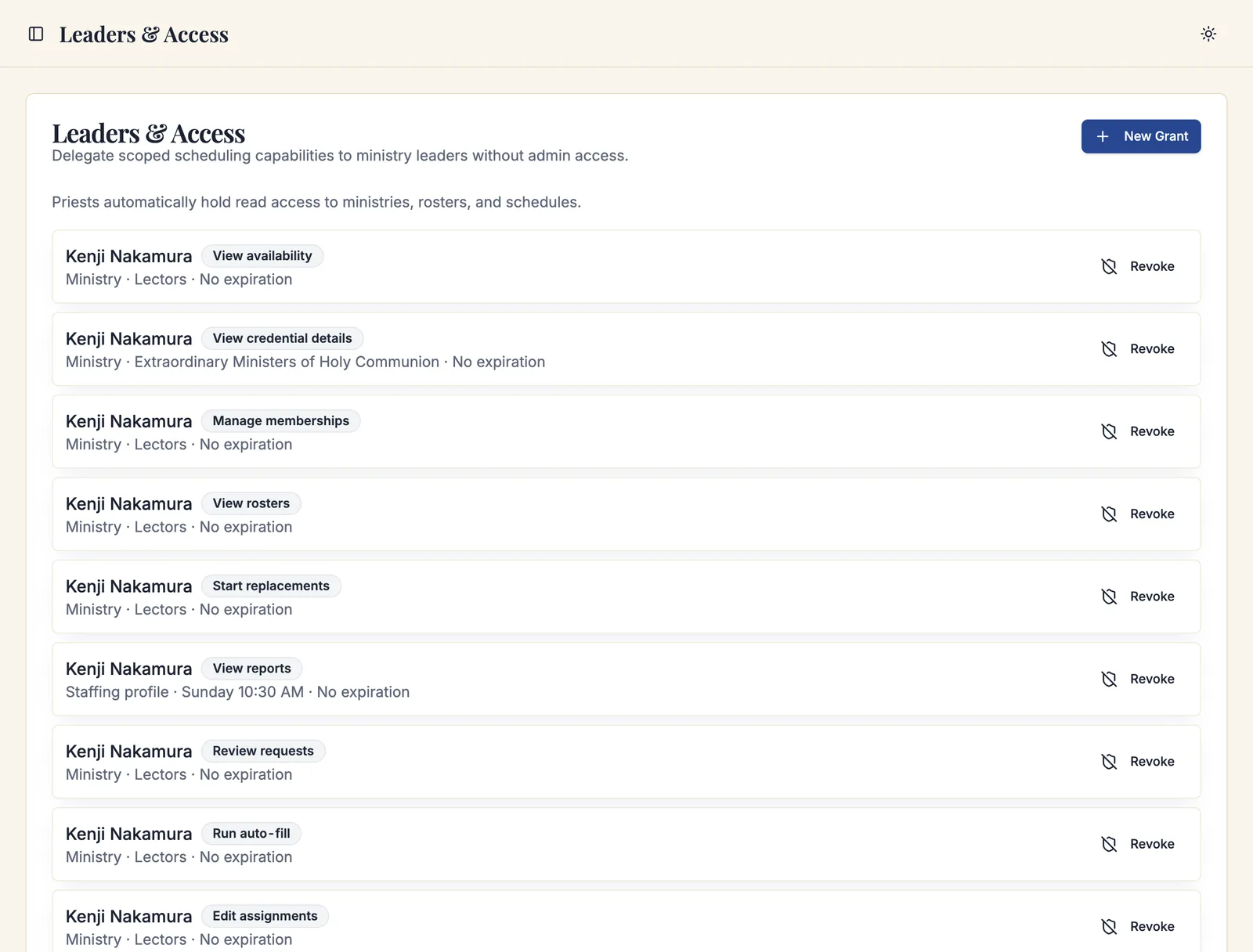
- A user — the person receiving it.
- A capability — exactly one thing they may do.
- A scope — where they may do it.
Everything else stays closed. A leader with Edit assignments scoped to the Lectors ministry can fill lector positions and nothing else — not the servers, not the ushers, not the parish settings.
Grants can also carry Valid from and Valid until dates, which is how you hand a ministry to an interim coordinator for one season without having to remember to take it back.
Granting access
Navigate to Admin Dashboard → Ministry Scheduler → Leaders & Access and click New Grant.
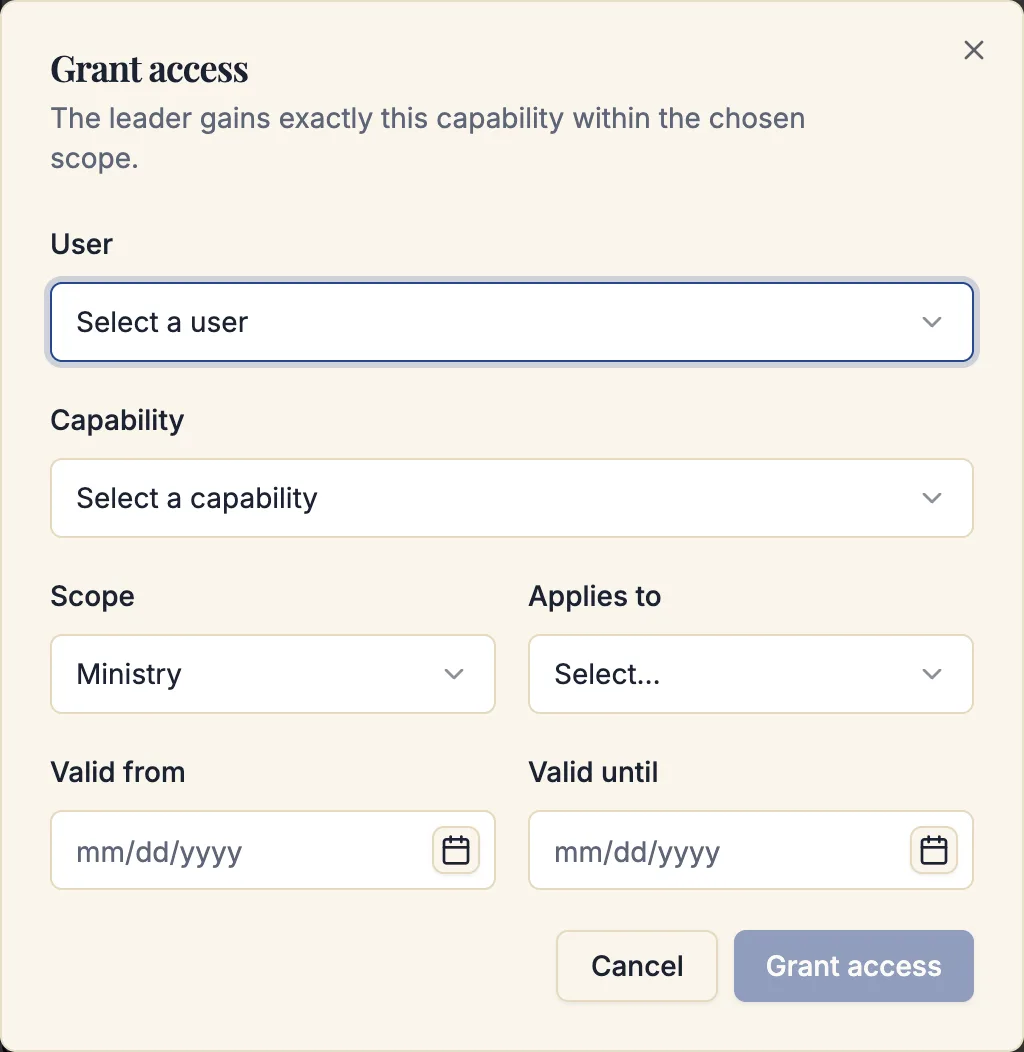
- Choose the User.
- Choose the Capability.
- Choose the Scope:
- Parish-wide — every ministry.
- Ministry folder — every ministry in one folder.
- Ministry — one ministry.
- Role — one role inside a ministry.
- Staffing profile — one service requirement.
- Location — one church or chapel.
- Choose what it Applies to — which folder, ministry, role, requirement, or location.
- Optionally set Valid from and Valid until.
- Click Grant access.
Repeat for each capability the leader needs. Most leaders end up with three or four.
The capabilities
| Group | Capability | What it allows |
|---|---|---|
| General | View ministries | See the ministries and roles in scope. |
| Members | View rosters | See who is enrolled. |
| Members | Manage memberships | Enroll, edit, and archive members. |
| Credentials | View credential details | See certifications on a member's record. |
| Credentials | Record credentials | Add, verify, and revoke certifications. |
| Availability | View availability | See when volunteers can and cannot serve. |
| Scheduling | View schedules | See schedules and the board, read-only. |
| Scheduling | Edit assignments | Assign, release, and replace on the board. |
| Scheduling | Publish schedules | Validate and publish. |
| Scheduling | Run auto-fill | Queue an automatic scheduling proposal. |
| Scheduling | Apply auto-fill proposals | Write a proposal to the schedule. |
| Scheduling | Override hard blocks | Assign over blocks a normal leader cannot. |
| Requests | Review requests | Approve and decline sign-ups and applications. |
| Requests | Start replacements | Send replacement invitations. |
| Requests | Approve trades | Decide trades awaiting review. |
| Communications | Send communications | Send messages to the ministries in scope. |
| Operations | Manage resources | Manage the resources a ministry uses. |
| Operations | Check in attendance | Record who actually served. |
| Operations | Reconcile attendance | Correct attendance after the fact. |
| Operations | View reports | Run the ministry reports in scope. |
| Operations | Run exports | Export report data. |
| Administration | Manage ministry settings | Change the parish-wide Ministry Scheduling settings. |
| Administration | Manage access grants | Grant and revoke access to others. |
Manage access grants and Manage ministry settings are parish-wide powers regardless of the scope you attach them to in spirit — a leader who can grant access can grant themselves more. Keep both with parish administrators.
Run auto-fill and Apply auto-fill proposals are deliberately separate. A common and sensible arrangement gives a ministry leader the ability to run a proposal and read its explanation, while the coordinator who knows the whole parish applies it.
What a leader sees
A leader with grants signs in as a normal parishioner. In the My Parish sidebar they find Ministry Scheduler; opening it shows Your active access — the capabilities they hold — followed by only the areas those capabilities unlock:
- Ministries and the roles inside them, if they can view ministries.
- Scoped roster, if they can view rosters.
- Schedules in their scope, if they can view schedules — with automatic scheduling attached where they hold that capability.
- The requests inbox, if they can review requests or approve trades.
On the schedule board, a scoped leader sees a Showing your ministries badge and only the positions inside their scope.
Revoking
Click Revoke on a grant and confirm. The leader loses that capability immediately. Revoking cannot be undone, but you can create a new grant at any time.
Revoked grants stay listed with a Revoked status, so the history of who held what is preserved.
Suggested arrangements
A ministry coordinator who runs their own ministry end to end: View ministries, View rosters, Manage memberships, View availability, View schedules, Edit assignments, Review requests, Start replacements, Approve trades, View reports — all scoped to their one ministry.
A leader who fills the board but does not manage people: View ministries, View rosters, View availability, View schedules, Edit assignments — scoped to a ministry or a single role.
An interim coordinator covering a season: Any of the above, with Valid from and Valid until set to the season's dates.
A safe-environment officer: View rosters, View credential details, Record credentials — scoped parish-wide.
A ministry leader you want reading the numbers only: View ministries, View schedules, View reports.
Troubleshooting
The leader sees "Your access is active" but no tools
They hold a capability whose surface has not been unlocked for them — most often a capability without the matching view capability. A leader who can Edit assignments but cannot View schedules has nothing to open. Add the view capability.
The leader sees an empty roster or empty schedule list
Their grant is scoped narrower than they expect — to a single role rather than the ministry, for example. Check the Applies to value on each grant.
A leader cannot apply an automatic scheduling proposal
They hold Run auto-fill but not Apply auto-fill proposals. The proposal itself tells them so. Grant the second capability if that was not intended.
A former leader still appears in the list
Grants are revoked, not deleted, so the record of who held what survives. Confirm the row shows Revoked; if it still shows Active, revoke it.
What's next
- Ministry Scheduler overview — how the areas a leader unlocks fit together
- The requests inbox — the queue most leaders live in
- Ministry reports — what a leader can see about their own ministry
Related articles
- Roles and access — the parish-wide role model
- Managing users — accounts and parish roles
- Automatic scheduling — running versus applying a proposal